Flutter
Animación Swipe con cambio de background
31 diciembre, 2020
•
6,324 lecturas
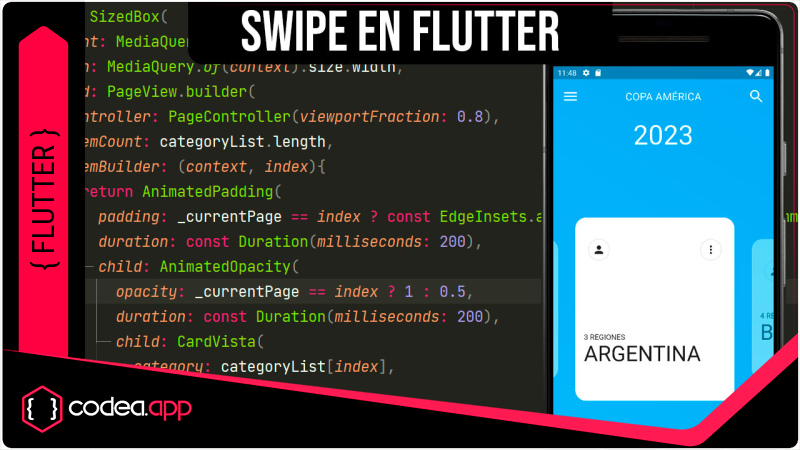
Diseño de una interfaz animada en Flutter usando Provider para cambiar el estado de un widget desde otro, Ejemplo con card de paises Perú, Bolivia, México.
Por ahora veamos parte del código fuente:
main.dart
import 'package:flutter/material.dart';
import 'package:swipe/inicio.dart';

void main() {
  runApp(MyApp());
}

class MyApp extends StatelessWidget {
  // This widget is the root of your application.
  @override
  Widget build(BuildContext context) {
    return MaterialApp(
      title: 'Flutter Demo',
      debugShowCheckedModeBanner: false,
      theme: ThemeData(
        primarySwatch: Colors.blue,
        visualDensity: VisualDensity.adaptivePlatformDensity,
      ),
      home: MyHomePage(),
    );
  }
}
inicio.dart
import 'background.dart';
import 'colorProvider.dart';
import 'paginas.dart';
import 'package:flutter/material.dart';
import 'package:provider/provider.dart';

class MyHomePage extends StatefulWidget {
  @override
  _MyHomePageState createState() => _MyHomePageState();
}

class _MyHomePageState extends State<MyHomePage> {

  @override
  Widget build(BuildContext context) {

    return ChangeNotifierProvider(
      create: (_) => ColorProvider(),
      child: Scaffold(
        body: Stack(
          alignment: Alignment.center,
          children: <Widget>[
            Bg(),
            Positioned(
              top: 40,
                child: Container(
              width: MediaQuery.of(context).size.width,
              padding: const EdgeInsets.symmetric(horizontal: 16),
              child: Row(
                mainAxisAlignment: MainAxisAlignment.spaceBetween,
                children: const [
                  Icon(
                    Icons.menu,
                    color: Colors.white,
                    size: 32,
                  ),
                  Text(
                    'COPA AMÉRICA', style: TextStyle(color: Colors.white, fontSize: 20)
                  ),
                  Icon(Icons.search, color: Colors.white, size: 32),
                ],
              ),
            )),
            const Positioned(
              top: 100,
              child: Text("2023",style: TextStyle(color: Colors.white, fontSize: 50),),
            ),
            Positioned(
                bottom: 60,
                child: Paginas()),
          ],
        ),
      ),
    );
  }
}
background.dart
import 'colorProvider.dart';
import 'package:flutter/material.dart';
import 'package:provider/provider.dart';

class Bg extends StatelessWidget {
  @override
  Widget build(BuildContext context) {
    return Consumer<ColorProvider>(builder: (context, colorProvider, __) {
      return AnimatedContainer(
        duration: Duration(milliseconds: 200),
        decoration: BoxDecoration(
            gradient: LinearGradient(
                colors: colorProvider.colorSelect,
                begin: Alignment.bottomLeft,
                end: Alignment.topRight)),
      );
    });
  }
}
card.dart
import 'item.dart';
import 'package:flutter/material.dart';

class CardVista extends StatelessWidget {

  final Category category;

  const CardVista({Key? key, required this.category}) : super(key: key);

  @override
  Widget build(BuildContext context) {
    return Container(
      width: 200,
      margin: const EdgeInsets.only(
        right: 32
      ),
      decoration: BoxDecoration(
        borderRadius: BorderRadius.circular(20),
        color: Colors.white,
      ),
      child: Padding(
        padding: const EdgeInsets.all(16.0),
        child: Column(
          crossAxisAlignment: CrossAxisAlignment.start,
          children: [
            const SizedBox(
              height: 24,
            ),
            Padding(
              padding: const EdgeInsets.symmetric(horizontal: 8.0),
              child: Row(
                mainAxisAlignment: MainAxisAlignment.spaceBetween,
                children: [
                  Container(
                    height: 40,
                    width: 40,
                    decoration: BoxDecoration(
                      borderRadius: BorderRadius.circular(100),
                      border: Border.all(
                        color: Colors.black12,
                      ),
                    ),
                    child: Icon(category.icon),
                  ),
                  Container(
                    height: 40,
                    width: 40,
                    decoration: BoxDecoration(
                      borderRadius: BorderRadius.circular(100),
                      border: Border.all(
                        color: Colors.black12,
                      ),
                    ),
                    child: Icon(Icons.more_vert),
                  ),
                ],
              ),
            ),
            Spacer(),
            Text(
              '${category.totalTasks} REGIONES',
            ),
            Text(
              category.title, style: const TextStyle(fontSize: 40),
            ),
            const SizedBox(
              height: 32,
            ),
            const SizedBox(
              height: 16,
            )
          ],
        ),
      ),
    );
  }
}
colorProvider.dart
import 'package:flutter/material.dart';

const LISTA_COLORES = [
  [Color(0xFFEC407A),Color(0xFFE91E63)],
  [Color(0xFFFFEE58),Color(0xFFFFEB3B)],
  [Color(0xFF29B6F6),Color(0xFF03A9F4)],
  [Color(0xFF66BB6A),Color(0xFF4CAF50)],
  [Color(0xFF66BB6A),Color(0xFF4CAF50)],
  [Color(0xFFEC407A),Color(0xFFE91E63)],
  [Color(0xFFFFEE58),Color(0xFFFFEB3B)],
  [Color(0xFF29B6F6),Color(0xFF03A9F4)],
  [Color(0xFF66BB6A),Color(0xFF4CAF50)],
  [Color(0xFF66BB6A),Color(0xFF4CAF50)]
];

class ColorProvider extends ChangeNotifier{
  List<Color> colorSelect=LISTA_COLORES.first;
  changeColors(int index){
    colorSelect = LISTA_COLORES[index];
    notifyListeners();
  }
}
item.dart
import 'package:flutter/material.dart';

class Category {
  IconData icon;
  String title;
  int totalTasks;

  Category({
    required this.icon,
    required this.title,
    required this.totalTasks,
  });
}

List<Category> categoryList = [
  Category(
    icon: Icons.person,
    totalTasks: 1,
    title: 'PERÚ',
  ),
  Category(
    icon: Icons.person,
    totalTasks: 2,
    title: 'CHILE',
  ),
  Category(
    icon: Icons.person,
    totalTasks: 3,
    title: 'ARGENTINA',
  ),
  Category(
    icon: Icons.person,
    totalTasks: 4,
    title: 'BOLIVIA',
  ),
  Category(
    icon: Icons.person,
    totalTasks: 5,
    title: 'PARAGUAY',
  ),
  Category(
    icon: Icons.person,
    totalTasks: 6,
    title: 'BRASIL',
  ),
  Category(
    icon: Icons.person,
    totalTasks: 7,
    title: 'COLOMBIA',
  ),
  Category(
    icon: Icons.person,
    totalTasks: 8,
    title: 'ECUADOR',
  ),
  Category(
    icon: Icons.person,
    totalTasks: 9,
    title: 'VENEZUELA',
  ),
  Category(
    icon: Icons.person,
    totalTasks: 10,
    title: 'URUGUAY',
  ),
];
paginas.dart
import 'card.dart';
import 'item.dart';
import 'colorProvider.dart';
import 'package:flutter/material.dart';
import 'package:provider/provider.dart';

class Paginas extends StatefulWidget {
  @override
  _PaginasState createState() => _PaginasState();
}

class _PaginasState extends State<Paginas> {
  int _currentPage = 0;
  @override
  Widget build(BuildContext context) {
    return SizedBox(
      height: MediaQuery.of(context).size.height * 0.50,
      width: MediaQuery.of(context).size.width,
      child: PageView.builder(
        controller: PageController(viewportFraction: 0.8),
        itemCount: categoryList.length,
        itemBuilder: (context, index){
          return AnimatedPadding(
            padding: _currentPage == index ? EdgeInsets.all(0) : EdgeInsets.symmetric( vertical: 40),
            duration: Duration(milliseconds: 200),
            child: AnimatedOpacity(
              opacity: _currentPage == index ? 1 : 0.5,
              duration: Duration(milliseconds: 200),
              child: CardVista(
                category: categoryList[index],
              ),
            ),
          );
        },
        onPageChanged: (newPage){
          setState((){
            _currentPage = newPage;
          });
          Provider.of<ColorProvider>(context,listen: false).changeColors(newPage);
        },
      ),
    );
  }
}
El código completo de los archivos Dart, pueden obtenerlos en el enlace de descarga.
Recurso del Tutorial
Gratis
20 descargas
Tutoriales Recomendados
Sigue explorando publicaciones de la misma categoría